
 Additional settings for Safari Browser.


Stopfinder
Serving with Excellence and Care
Welcome to Southwest Allen County School’s Transportation Department, where we prioritize safe and efficient transportation for students. We understand the vital role transportation plays in ensuring that students have access to education. Our dedicated team of professionals is committed to providing safe and effiecient transportation services to the school community. We prioritize safety above all else, implementing strict protocols and adhering to local regulations to guarantee the well-being of every student on our buses. Our drivers are experienced and trained to handle any situation that may arise during transportation, ensuring a smooth and secure journey to and from school.
The Southwest Allen County School Corporation owns and operates its own fleet of school buses. Bus capacities range from 10 passengers to 84 passengers.
Southwest Allen County School System is introducing the Stopfinder app which will replace Here Comes The Bus.
Stopfinder is an all-in-one parent app that allows SACS to share your student's transportation schedule, announcements, and more. Stopfinder works with SACS’ transportation software to provide you the most accurate schedule information as quickly as possible.
Stopfinder is secure and only for registered users. SACS will send you an invitation providing access to log in to the Stopfinder app. Invitations will be sent through email. Stopfinder is available anytime for Stopfinder Subscribers. View your student's schedule from your mobile device.
Share student schedules with caregivers and family members and view announcements and notifications in the Stopfinder Message Center. Check your email for a Stopfinder invitation and visit the App Store or Google Play to download Stopfinder.
Our buses at SACS are equipped with GPS, so we can get realtime positioning so that we can figure out the exact second that a bus will arrive at its next stop. Parents can also pull this information for their students, with

Features
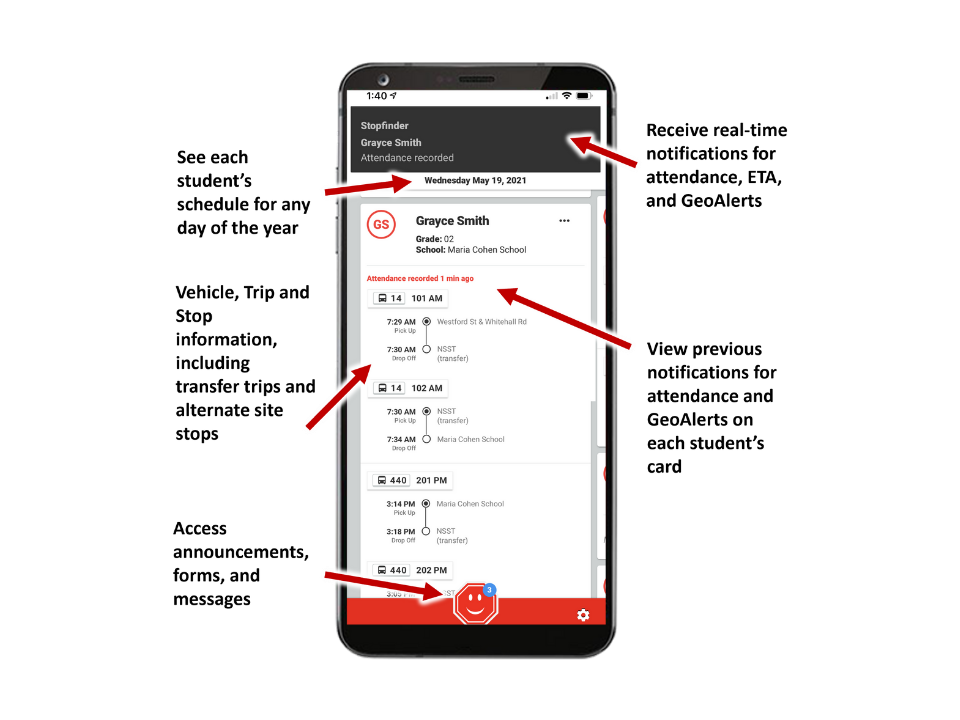
- View your student’s daily transportation assignments – including transfer trips and stops
- Securely share your student’s schedule with other caregivers
- Receive notifications and updates related to transportation
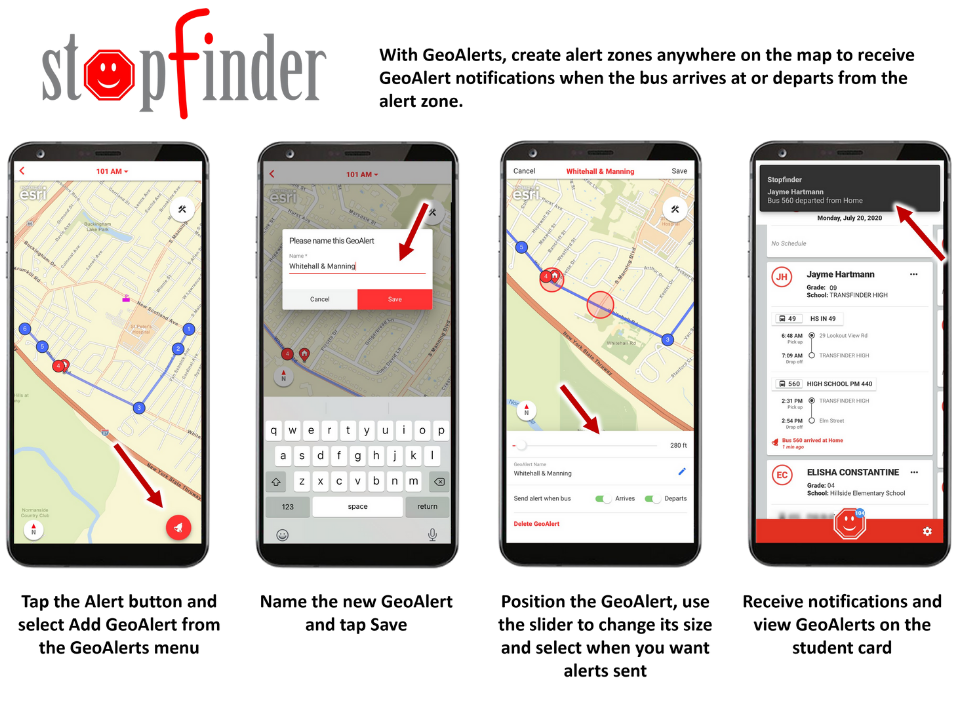
- Send real-time vehicle location notifications based on GeoAlert regions you create for your student
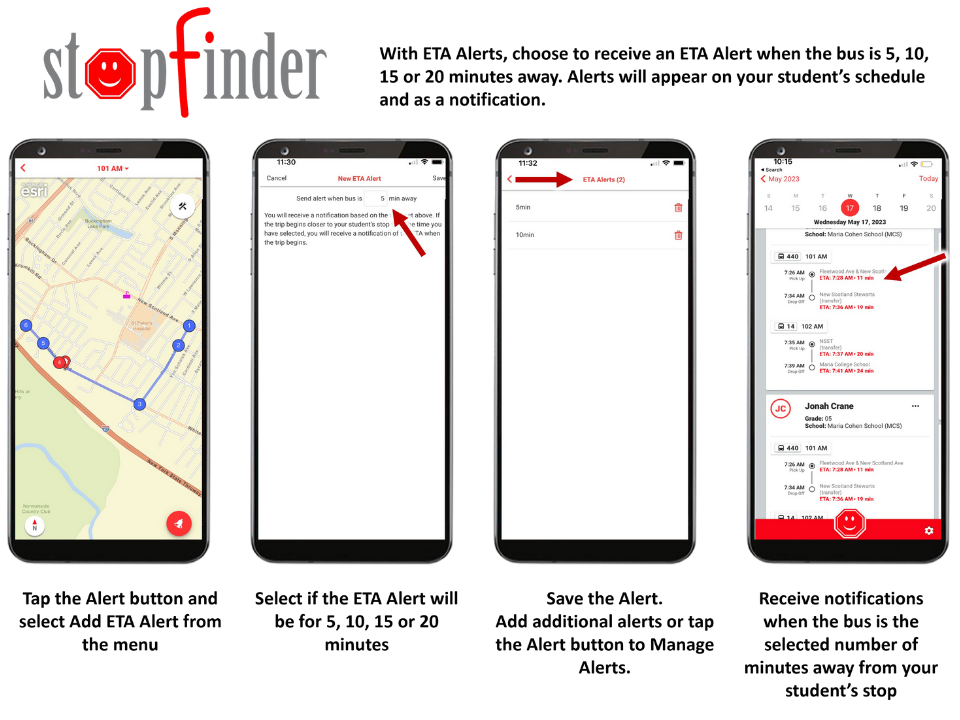
- Send Estimated Time of Arrival notifications based on your student’s stop

Frequently Asked Questions
Download Stopfinder for Android or Apple devices


-
How it Works:
- When a student swipes their bus card, parents will be able to see the time and location the student swiped on or off the bus. It will send a notification to the parent when this happens.
- If a parent has more than one student, they are able to see the route information for each student.
- Parents are able to set up geo-alerts around their home and school so they will be notified when the bus enters the geo-zone. Parents will need to set up geo-alerts for each student separately to receive the notifications.
- Stopfinder invitations will be sent out to a student’s primary contact as listed in the Transfinder routing system. This is the primary contact email the parent has shared with the district.
- Once a parent activates their Stopfinder app, they will be able to see the routing information for any student who has them listed as the primary contact.
- Only the parent/guardian is able to share their students Stopfinder information. They will do this by inviting others (daycare, grandparent, etc.) using the Stopfinder app.
-
Contact the SACS’ Transportation Department @ Transportation Department
-
GeoAlerts allows users to see the maps for your location and set Alert zones. Please view this video to learn about Stopfinder GeoAlerts – Stopfinder Geo Alerts
-
Student schedules are based on the day being viewed. If there is no school planned for the date being viewed, no schedule will appear. Swipe to the next school day to view your student’s schedule. If your student is not transported on the day or days being viewed, including regular school days, “No Schedule” will appear.
-
Contact the SACS’ Transportation Department @ Transportation Department for this request
-
Tap the ellipses (...) menu on the upper right-hand corner of the student card for the student you wish to share. Tap Share Schedule on the menu that opens at the bottom of the screen. Enter the required fields on the Share Schedule screen and tap Share.
-
No, only Primary Subscribers can share student schedules. Contact SACS’ Transportation Department with questions concerning your student's Primary Subscribers list.
-
Tap the ellipses menu on the upper right-hand corner of the student card. Tap the Map button on the menu that opens at the bottom of the screen.
-
From the student map, tap the red GeoAlert button on the bottom of the screen. If your district has GeoAlerts, follow the prompts to draw one or more alert zones on the map.
-
Contact SACS’ Transportation Department with questions about specific students and their schedules
-
Contact SACS’ Transportation Department to correct stop information.
School Delays and Closings
School delay and closing announcements are immediately posted on the SACS Web Site and are released to these local radio and television stations:
- Television Stations: WANE,WISE,WPTA
- Radio Stations: WXKE, WBCL, WAJI-WLDE, WBTU, WBNI, WJFX, WBYR, WFWI/MUSIC, WGL
Transportation Office : 260-431-2070
Transportation e-mail: transportation@sacs.k12.in.us